电话:010-84863903;
传真:010-84863953
邮箱:maiqin@geoimage88.com
地址:北京市朝阳区新源南路6号
京城大厦3502室
 当前位置:首页 > 新闻中心
| Leapfrog 2025.3 |
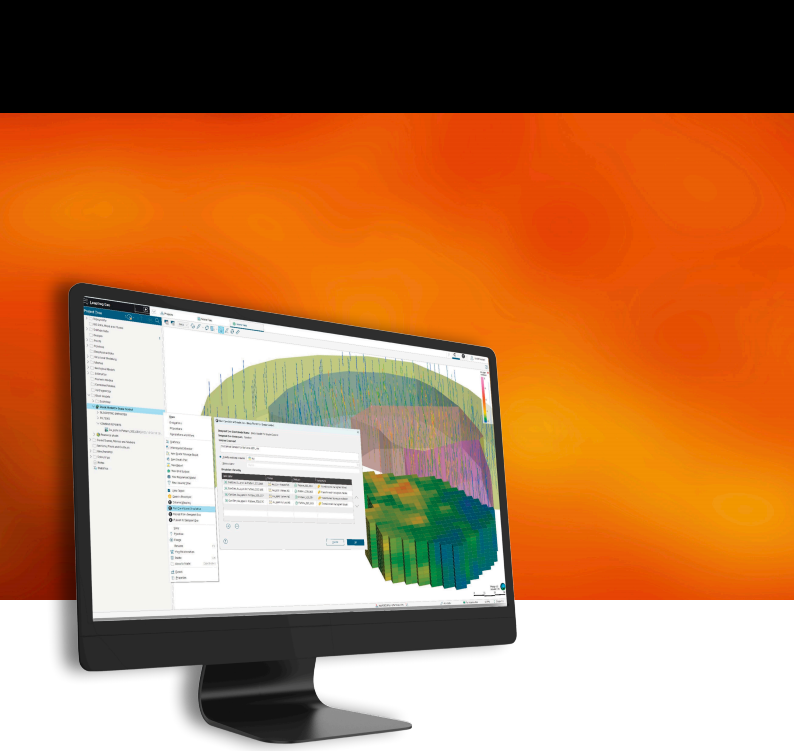
Leapfrog 2025.3版本说明 Leapfrog 2025.3优先考虑统计和探索性数据分析工作流程,简化结构趋势的分析和应用,并增强平台集成。 借助Leapfrog 2025.3 ,您可实现更高效的作业流程,将更多工作环节保留在Leapfrog平台,避免返工,并从地质与采矿数据中获取更清晰的认识。 本次升级亮点包括:新增统计图表的保存、共享与回看功能;优化结构趋势分析模块,使建模过程更清晰直观;关联功能标签页中已集成Imago图像流传输技术。特别值得关注的是,钻井设计功能对用户经常使用的功能进行了提升,显著提升了工具的实用性和易用性。此外,通过增强与Evo和BlockSync的连接性,支持未来的工作流程,并配合重新设计的条件模拟用户界面,为用户带来更完善的体验。 这些更新协同作用,可立即提升生产力,进一步优化桌面体验,并为Leapfrog的持续改进与长期发展奠定基础。
Leapfrog 2025.3 Release Notes
Leapfrog 2025.3 prioritises statistical and exploratory data analysis workflows, simplifies the analysis and application of structural trends, and enhances platform integration. With Leapfrog 2025.3 you can work more optimally, stay in Leapfrog for a larger part of your workflow, eliminate rework, and gain greater understanding from geological and mining data. Key highlights include the ability to save, share, and revisit statistical graphs and tables; adjustments to structural trend analysis for clearer and more intuitive modelling; and Imago image streaming is now embedded within the correlation tab view. Worth noting are several frequently requested improvements added to the planned drilling feature, making the tool more practical and easier to use. Additionally, enhanced connectivity with Evo and BlockSync supports scalable, future-ready workflows, complemented by a redesigned conditional simulation user experience. Together, these updates provide immediate productivity gains, further advance the desktop experience and position Leapfrog for continued enhancement and longevity 主要改进 Leapfrog 2025.3中包含的主要功能包括: • 强大的Imago图像流 • 钻孔剖面图中支持在二维和三维视图中查看可视化岩芯照片 • 可选数据集参数用于灵活的图像设置 • Imago影像与Leapfrog项目无缝对接的自动单位转换 • 高效地统计分析 • 保存图表和表格,便于整理,减少重复工作 • 增强模型验证与评估的斑块图 • 通过增强的结构功能获得更深入的洞察 • 通过立体网格过滤控制实现结构解释的改进 • 结构趋势聚类的透明度与灵活性提升 • 更智能、更精准的结构趋势与网格过滤 • 用Seequent Evo精确掌控地下信息 • 为地球科学对象分配阶段,将其归类至文件夹,并从Evo批量重新加载 • 变异椭球体数据解析的新型工具 • 轻松共享属性,从数据中获取更多价值 • BlockSync优化的条件模拟新工作流程提升生产力与易用性 Main improvements
Top features included in Leapfrog 2025.3 include: • Powerful Imago image streaming • Drillhole correlation support for visualising core photos in both 2D and 3D views • Optional dataset parameter for flexible image setup • Automatic unit conversion for seamless alignment between Imago imagery and Leapfrog projects • Efficient geostatistical analysis • Save graphs and tables for easy organisation and less rework • Swath plots for enhanced model validation and evaluation • Deeper insights through enhanced structural capabilities • Improved structural interpretation with stereonet filtering controls • Greater transparency and flexibility in structural trend clustering • Smarter, more targeted structural trends with mesh filtering • Evolve your subsurface intelligence with Seequent Evo • Assign geoscientific objects a stage, organise them into folders, and bulk reload from Evo • Powerful new tools for interpreting Driver’s ellipsoid data • Get more from data by sharing attributes easily • Conditional simulation’s new streamlined workflow with BlockSync improves productivity and usability
1. Leapfrog功能与特性1.1. 钻孔数据1.1.1. 高效统计分析,新增统计功能1.1.1.1. 保存的图表1. Leapfrog features and functionality 1.1. Drillhole data 1.1.1. Efficient statistical analysis with new statistics features 1.1.1.1. Saved graphs and tables
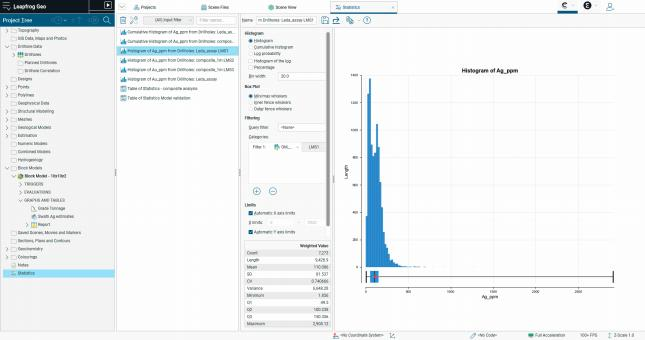
通过Leapfrog 2025.3,您的统计结果现在可安全保存并轻松访问。新增的统计标签页允许您快速保存和共享可直接生成报告的图表,这样就不用每次都重新制作它们了。 With Leapfrog 2025.3, your statistical findings are now securely saved and easily accessible. A new statistics tab allows you to quickly save and share report-ready graphs, eliminating the need to recreate them each session. 保存的图表会显示在项目树的统计模块中,形成动态分析库,支持地质建模与估算流程可追溯、协作和决策支持。用户可将分析成果保存至后续会话和报告,减少重复手动操作,专注于数据解读而非重复建模。图表支持高度自定义,包括可调节字号和直观命名,帮助用户创建清晰专业的可视化图表,随时用于报告和演示。 Saved graphs appear under a dedicated statistics item in the project tree, creating a dynamic library of analysis that supports auditability, collaboration, and confident decision-making across geological modelling and estimation workflows. Users can preserve their insights for future sessions and reports, reduce manual rework, and focus more on interpretation than recreation. Graphs are also more customisable, with adjustable font sizes and intuitive naming, helping users create clear, professional visuals ready for reporting and presentation.
1.1.1.2. 统计表的多个输入统计表新增一项功能,用户可添加输入数据,便于对不同表格(如用于模型验证的复合模型与区块模型数据)进行动态对比。该改进减少了对外部软件的依赖,同时更加透明、可追溯。 此次更新标志着向更互联、高效和可靠的统计分析体验迈出了重要第一步。 1.1.1.2. Multiple inputs for table of statistics A new feature has been introduced to the table of statistics that enables users to add inputs, facilitating dynamic comparisons between different tables, such as composite and block model data for model validation. This enhancement minimises dependence on external software while improving transparency and traceability. This update marks an important first step toward a more connected, efficient, and reliable statistical analysis experience.
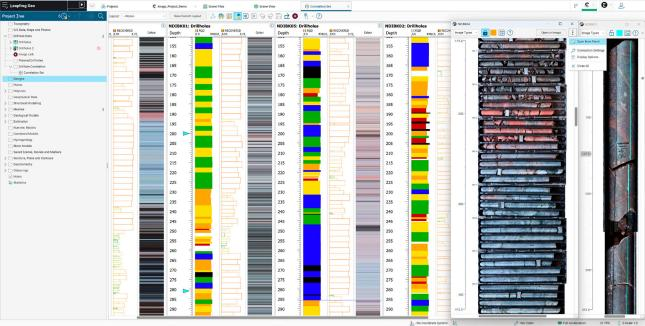
1.1.2. 强大的Imago图像流在Leapfrog 2025.2版本中,我们推出了Leapfrog-Imago图像流技术,彻底革新了地球科学家在建模各阶段从影像中获取认识的方式。在Leapfrog 2025.3版本中,我们进一步优化了该集成功能,显著提升了其可用性和灵活性。 1.1.2. Powerful Imago image streaming In Leapfrog 2025.2, we introduced Leapfrog-Imago image streaming to revolutionise how geoscientists derive insights from imagery at every stage of modelling. In Leapfrog 2025.3, we have further enhanced this integration to improve its usability and flexibility. 1.1.2.1. 孔剖面成像Leapfrog 2025.3版本现已将3D场景的图像流功能引入钻孔相关分析,支持在2D和3D工作流程中轻松可视化图像。此外,新增的快速菜单快捷方式可同时打开多个Imago面板,显著提升工作效率。 1.1.2.1. Visualise images in hole correlation Leapfrog 2025.3 now brings the same image streaming capability of the 3D scene to drillhole correlation, allowing images to be easily visualised in both 2D and 3D workflows. Additionally, a new quick menu shortcut makes it easier to open multiple Imago panels at once, improving efficiency when reviewing imagery.
1.1.2.2. 数据集参数的灵活设置Imago连接设置中的数据集参数现已变为可选项,使图像数据的结构配置更具灵活性。将数据集名称设为空值后,用户无需手动切换不同钻井类型或矿层的数据集,因为Leapfrog系统会根据现有影像数据自动选择对应数据集。 1.1.2.2. Dataset parameter for flexible setup The dataset parameter in Imago connection settings is now optional, providing greater flexibility in how image data is structured in Imago. Setting the dataset name to blank removes the need to manually switch datasets for different drilling types or mine levels, as Leapfrog will automatically select the appropriate dataset based on available imagery. 1.1.2.3. 自动单位换算Leapfrog现已支持Imago工区与Leapfrog项目之间的自动单位转换。当Imago影像数据与Leapfrog项目数据使用不同单位(如英尺与米)时,系统将自动完成单位转换。该功能可确保影像与钻孔数据保持一致,无需人工调整。在Leapfrog Imago连接设置中,需将单位设置为Leapfrog项目所采用的单位。 1.1.2.3. Automatic unit conversion Leapfrog now supports automatic unit conversion between Imago workspaces and Leapfrog projects. If Imago imagery and Leapfrog project data use different units, such as feet and metres, the integration will automatically convert between them. This ensures consistent alignment of imagery and drillhole data without manual adjustments. In the Leapfrog Imago connection settings, set the unit to the units of the Leapfrog project.
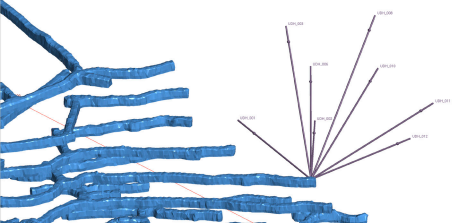
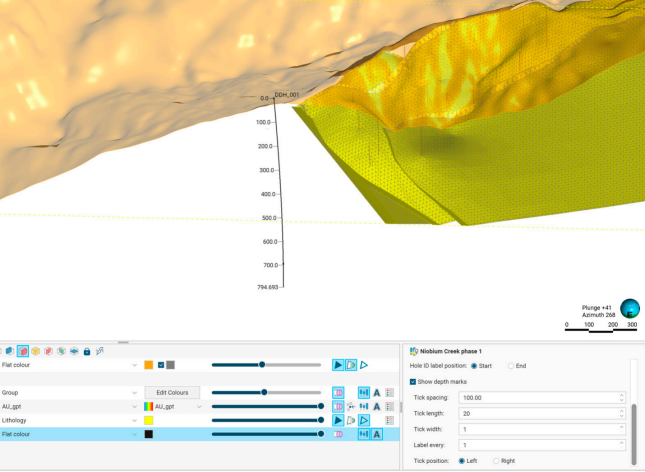
1.1.3. 提升设计钻井的用户体验1.1.3.1. 新增设计钻孔组孔口标记结束在地下钻井共用井口位置的规划钻井中,常出现孔径标识重叠的问题,导致三维场景中难以区分各钻孔。Leapfrog 2025.3 版本新增了在钻井起始端或末端标注标识的功能。此次更新不仅提升了操作灵活性,还优化了可视化效果,使钻井识别、截图制作及钻井方案沟通都变得更加便捷高效。 1.1.3. Elevated user experience for planned drilling 1.1.3.1. End of hole labels for planned drillhole group Planned holes that share a collar location, such as underground fan drilling, often resulted in overlapping hole ID labels, making it difficult to identify individual holes in the 3D scene. In Leapfrog 2025.3, labels can now be placed at either the start or end of the hole. This update provides greater flexibility and improved visualisation, making it easier to identify holes, create clear screenshots, and communicate drilling plans.
1.1.3.2. 设计钻孔组深度标志钻井设计可以设置深度标记。用户可自定义标记位置,例如每隔50米设置刻度线,并标注50米、100米、150米、200米等数值。这些标记能直观展示钻孔深度分布,在视图中钻井设计更加清晰。 1.1.3.2. Depth markers for planned drillhole group Depth markers are now supported for planned drill holes. Users can customise the placement of depth marks, for example, displaying a tick mark every 50 metres downhole with corresponding labels such as 50, 100, 150, and 200 metres. These markers offer a clear way to visualize depth along a planned hole for better presentation of planned holes in the scene.
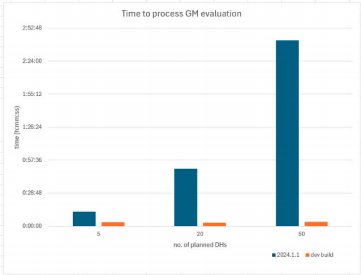
1.1.3.3. 提升效率在井位设计时叠合地质模型使工作效率显著提升,原先耗时数小时的任务现在仅需数分钟即可完成。 1.1.3.3. Performance improvements Significant performance improvements have been made to geological model evaluations on planned drillholes. Tasks that previously took hours to process now only take minutes.
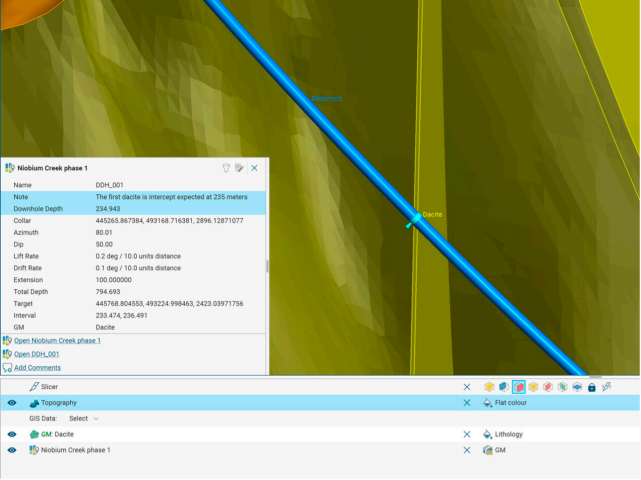
1.1.3.4. 提升视图细节 井下设计钻探深度现已在视图中清晰显示。在三维场景中选择设计钻孔,可查看所选位置的深度,便于识别关键位置。 规划钻孔组的批阅现亦显示于场景详情中,可直接在视图内访问规划标注。 1.1.3.4. Informative scene details Planned drilling downhole depth is now visible in scene details. Selecting a planned hole in the 3D scene reveals depth at the chosen point, aiding identification of key locations. Comments from Planned Drillhole groups are also now shown in scene details, providing access to planning notes directly in the scene.
1.1.3.5. 设计钻孔组可筛选导出
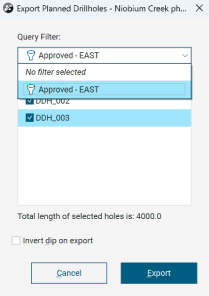
目前可将查询过滤器应用于导出设计钻孔参数。该功能使用户能够选择目标钻孔并仅导出选定钻孔,从而简化流程并节省时间。 1.1.3.5. Filter on export for planned drillhole group It is now possible to apply query filters when exporting planned drillholes as parameters. This allows users to select hole of interest and export only those, streamlining the process and saving time.
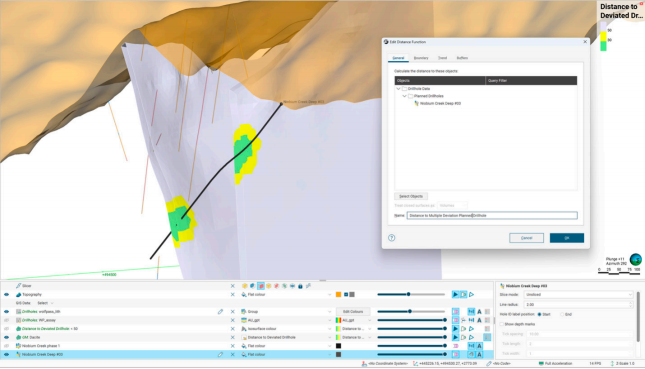
1.1.3.6. 具有多个定向井的距离函数 现在可将多个定向井数据输入距离函数,从而实现钻孔间距分析及邻近性核查,确保与其他孔或矿井开发区域保持最小距离。此举可提升风险评估水平,为钻孔规划提供更科学依据。 1.1.3.6. Distance functions with multiple deviation holes Multiple deviation holes can now be input into a distance function, allowing for drill spacing analysis and proximity checks to ensure minimum distance from other holes or mine developments. This enhances risk assessment and supports more informed drillhole planning.
1.1.3.7. 钻孔剖面图深度标记
在钻孔剖面图中,地质学家现可在 1.1.3.7. Drillhole correlation depth markers In the drillhole correlation view, markers can now be added at geological points of interest in 2D, which are also displayed in 3D. This makes it easier for geologists to orient themselves and correlate between 2D view location and 3D space. Multiple markers can be added for reference, supporting powerful analysis across geological features.
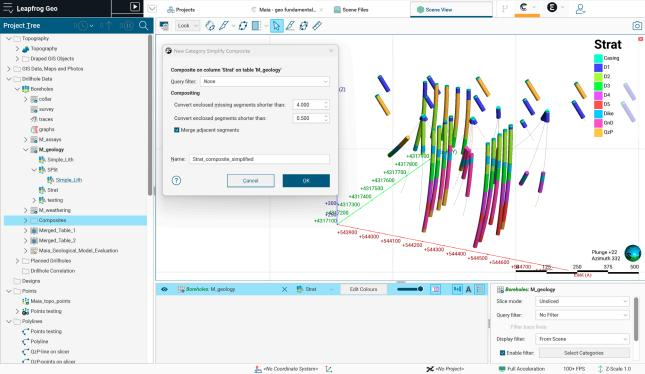
1.1.4. 基本样品组合的增强1.1.4.1.新增新类别简化的样品组合Leapfrog 2025.3版本推出了一款功能强大的新型样品组合工具,用户在保持地质背景信息的同时,能更灵活地控制分类数据的清理与简化过程。与传统将数据简化为主岩性、外部岩性及忽略岩性的组合方法不同,该工具保留原始岩性代码,并提供灵活的相邻段合并选项及短缺失层段转换功能。这一特性在风化作用模拟或地层建模等需要精确层厚数据的工作流程中具有重要价值。 1.1.4. Essential compositing enhancements 1.1.4.1. New category simplify composite Leapfrog 2025.3 introduces a powerful new composite tool that gives users greater control over how categorical data is cleaned and simplified while preserving geological context. Unlike traditional compositing that reduces data to Primary, Exterior, and Ignored codes,this new method retains original lithology codes and offers flexible options for merging adjacent segments and converting short or missing intervals. This is especially valuable for workflows like oxidation or stratigraphy modelling, where true layer thicknesses are critical.
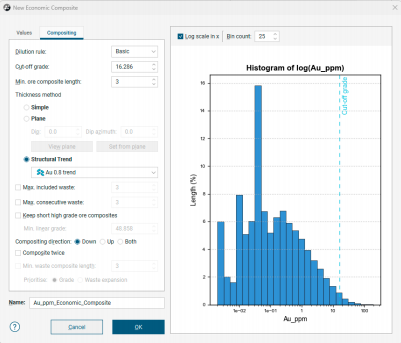
1.1.4.2.可按真厚度进行样品经济组合经济综合分析系统新增“构造趋势” 厚度计算功能,该功能以构造趋势为参考方向,通过计算各区间中点的真实厚度,能更真实地反映矿床几何形态,尤其适用于褶皱或倾斜地形。当输入的构造趋势与综合数据不重合时,系统将自动弹窗提示,确保操作透明可控。 1.1.4.2. True thickness in economic composite Economic Composite now offers the addition of a “Structural Trend” Thickness method, which calculates true thickness at each interval midpoint using a Structural Trend as the reference orientation. This provides a more geologically realistic representation of deposit geometry, especially in folded or dipping terrains. Leapfrog will alert users if the trend input doesn’t overlap with the composited data, ensuring transparency and control.
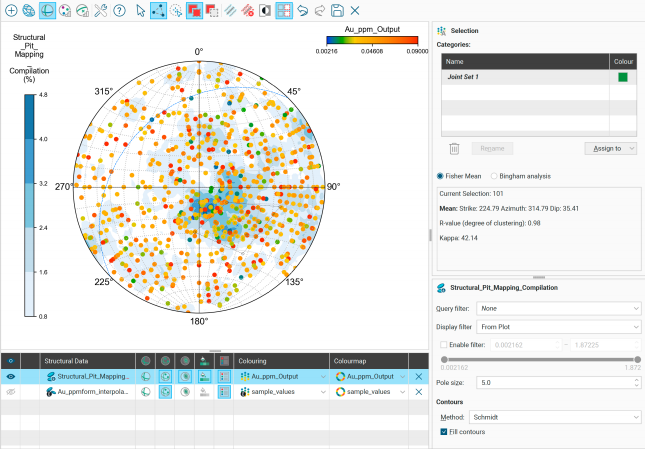
1.2. 通过增强的结构功能获得更深入的认识1.2.1. 立体网格界面布局及过滤功能的改进立体网格工具的最新升级让结构分析工作流程更轻松直观,这得益于增强的数据筛选选项、更灵活的编辑控制以及优化的界面布局。用户现在可以通过任意列(如地层斜率或地质属性)选择类别来筛选显示数据,从而在解释过程中获得更深入的认识。编辑类别选择现在更加简便,用户可同时调整列和色阶图,打破了以往的限制。立体网格场景现已集成显示筛选功能,例如类别选择器和双端滑块,这些功能不仅加快了数据探索速度,还显著提升了视觉清晰度。 此外,重新设计的属性面板和工具栏提升了易用性,为构造地质学家和建模人员提供了更简洁、响应更快的界面。 1.2. Deeper insights through enhanced structural capabilities 1.2.1. New interface layout and filtering in stereonet Latest updates to the stereonet tool make structural analysis workflows easier and more intuitive, thanks to enhanced data filtering options, more flexible editing controls, and cleaned-up interface layout. Users can now filter displayed data by choosing categories from any column, such as grade or geological attributes, which provides deeper insights during interpretation. Editing category selections is now simpler, as you can change both the column and the colourmap at the same time, removing earlier restrictions. The stereonet scene now includes integrated display filtering, like category selectors and double-ended sliders, which speeds up data exploration and sharpens visual clarity. Additionally, the redesigned properties panel and toolbar boost usability, giving structural geologists and modellers a cleaner, more responsive interface.
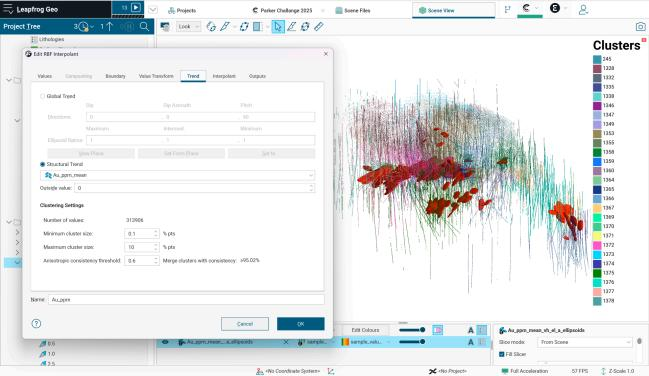
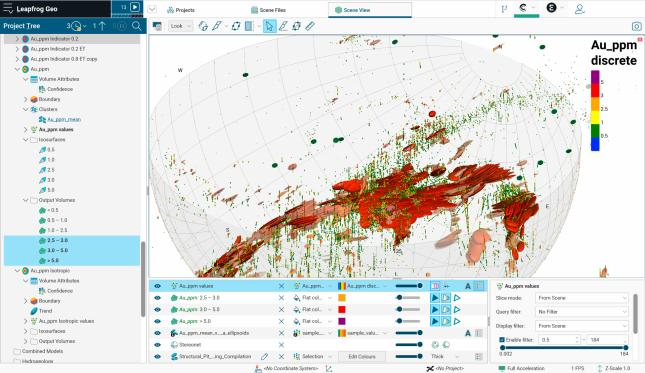
1.2.2. 结构趋势1.2.2.1. 聚类设置在Leapfrog 2025.3版本中,结构趋势的聚类设置已从趋势对象移至输入模型(如侵入面或适用的数值模型),将控制权和清晰度直接赋予模型及其影响的表面。通过将聚类配置与趋势分离,并将其整合到先进的表面处理工作流程中,用户能更深入地理解聚类过程,并从更具适应性的结构趋势中获益。这种设计使得单一趋势可适配多个模型,实现跨模型灵活应用。 为优化模型配置,系统现同步显示输入数据点数量与聚类参数,确保聚类结果真实反映原始数据特征。同时新增颜色编码功能,支持将聚类结果以分类颜色图形式直观呈现。 1.2.2. Structural trends 1.2.2.1. Clustering settings In Leapfrog 2025.3, clustering settings in structural trend have been moved from the trend object to the input model (such as an intrusion surface or suitable numeric models), bringing control and clarity directly to the model and surfaces the trend affects. By separating clustering configurations from the trend and integrating them into an advanced surfacing workflow, users can achieve a deeper insight into clustering processes and benefit from a more adaptable structural trend. This approach enables a single trend to be appropriately applied across multiple models. To support better model setup, the number of input data points is now shown alongside clustering settings, helping ensure clustering settings reflect the underlying data. Additionally, a new colouring option enables clustering results to be visualized as category-based colourings.
1.2.2.2. 基于网格属性的过滤为支持结构趋势生成中更灵活的数据选择,现可将查询过滤器应用于属性网格。此举可对趋势生成所用数据实施更精准的控制,从而提升结构解释的相关性与有效性。
1.2.2.3. 混合趋势与全局平均趋势当将全局趋势应用于混合结构趋势时,该全局趋势对象会作为输入项显示在项目树中。双击该对象即可在结构趋势对话框中打开全局均值趋势选项卡,便于查看全局趋势对模型的影响。
1.2.2.2. Filtering on mesh attributes To support more flexible data selection in structural trend generation, query filters can now be applied to attributed meshes. This allows for more targeted control over the data used in trend generation, improving the relevance and validity of structural interpretations.
1.2.2.3. Blended trends with global mean trend When a global trend is applied to a blended structural trend, the global trend object now appears as an input in the project tree.Double-clicking this object opens the global mean trend tab within the structural trend dialog, making it easier to access and understand how the global trend is influencing the model.
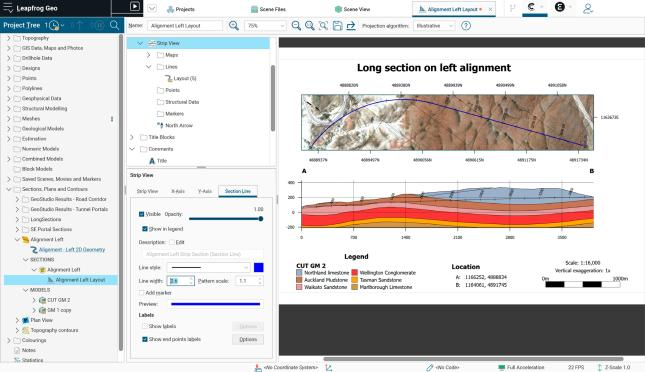
1.3. 在剖面视图的剖面线中改善网格展示效果1.3.1. 长剖面剖面线Leapfrog 2025.3版本针对长剖面功能进行了多项优化升级。过去需要人工费力对齐长剖面的剖面线,不仅耗时费力还容易出错。现在用户只需右键点击“平面视图”文件夹,选择“新建剖面线视图”,就能一键在任意长剖面添加剖面线。这项改进彻底解决了必须依赖平面视图的尴尬处境,既省时又省力,还避免了重复操作的麻烦。
1.3. Better site presentation in sections with strip views 1.3.1. New strip view for long sections Leapfrog 2025.3 introduces several improvements focused on long sections. Accurately aligning strip views on long sections was a task that previously relied on labour-intensive manual processes and was susceptible to inconsistencies. With Leapfrog 2025.3, users can now quickly add a strip view to any long section by right-clicking on the “Plan View” folder and selecting “New Strip View.” This enhancement removes the need to use a plan view as a workaround, time, effort and double handling work.
1.3.2. 新增剖面线的分段线控件剖面线视图中对剖分线外观的控制极为有限,仅允许通过颜色和粗细进行个性化调整。在Leapfrog 2025.3 版本中,剖面线视图新增了名为“剖分线”的选项卡,提供了全面的外观设置选项。此外,端点标签(如A到A′)的位置可直接在剖面线视图中进行调整。 这些更新共同提高了常规剖面和长剖面中剖面线视图中剖面线可视化的效率与一致性。 1.3.3. 新增剖面线视图最小距离标志在最小距离显示选项下新增的“显示符号”功能,可在剖面线视图中为结构测量值添加“+”或“–”符号。这一功有助于用户更准确地理解测量值在截面位置与方向上的空间分布关系。
1.3.4.桩号和长剖面当使用包含桩号信息的对齐方式定义长剖面路径时,默认段参数已从‘整条线路’更改为‘线路段’ 。这一调整能更直观地引导用户利用对象上的桩号信息,并使长剖面创建过程聚焦于目标区域。 该区域的X/Y轴显示选项新增了一个显示选项。当使用包含桩号信息的对齐方式定义区段路径时,系统默认会启用并设置一名为“投影距离”的新选项。该选项会在长轴上叠加桩号距离。
1.3.2. New section line controls for strip view Controls for section line appearance in the strip view were minimal, allowing only adjustments to colour and thickness for customisation. In Leapfrog 2025.3, a new tab called “Section Line” has been added to the strip view and provides a comprehensive set of appearance options. Additionally, the location of endpoint labels (e.g. A to A′) can be adjusted directly in the strip. Together, these updates improve the efficiency and consistency for visualizing section lines in strip views in both regular and long sections.
1.3.3. Minimum distance sign for strip view A new “Show sign” option under the minimum distance display options now adds “+” or “–” signs to structural measurements on the strip view. This small addition help users better interpret spatial distribution of measurements in relation to section position and orientation.
1.3.4. Chainage and long sections When alignments that contain chainage information are used to define the long section path, the section parameters default is now set to “line section” rather than “entire line”. This better prompts the user to make use of the chainage information on the object and to focus the long section creation to the area of interest more intuitively. A new display option has been added to the section’s X and Y axes display options. Again, when alignments that contain chainage information are used to define the section path, a new “projected distance” option has been added and set by default to be checked on. This option adds the chainage distance to the long section axis.
2. Leapfrog Edge功能与特性2.1. 应对地质统计学分析中的挑战借助新增的图表与统计保存功能,用户现在可以保存由钻孔、点位和区块模型生成的图表,确保关键地质统计分析结果保留在项目中。这一改进优化了数据洞察流程,促进科学决策并推进模型验证,使地质学家能够跨数据集保持单变量统计与对比统计的一致记录。通过将分析输出直接关联至统计项目,Leapfrog为地质统计解释和资源评估提供了更易审计、可重复且更可靠的工作流程。
2. Leapfrog Edge features and functionality 2.1. Addressing challenges in geostatistical analysis With new capabilities to saved graphs and statistics users can now save graphs generated from drillholes, points, and block models, ensuring that key geostatistical analyses are preserved within the project. This enhancement streamlines data insights, promotes informed decisions and advances model validation, allowing geologists to maintain a consistent record of univariate and comparative statistics across datasets. By keeping analytical outputs directly tied to the statistical item, Leapfrog delivers a more auditable, repeatable, and confidence-building workflow for geostatistical interpretation and resource evaluation.
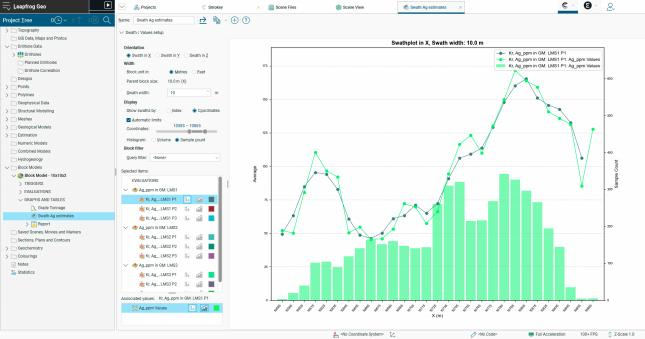
2.2. Swath图表改进在Leapfrog 2025.3版本中,Swath图表功能升级后,资源地质学家在验证区块模型估算时获得了更强的控制力。该功能是对比预估品位与实际数据的关键工具,能帮助用户更深入地了解矿床特征,并有效验证区块模型。 用户现在可以: • 查看各数据点的坐标 • 按域、类别或估算通道进行过滤块 • 查看各条带内的样本数量以更好地理解数据密度, • 设定坐标限制以聚焦特定区域,从而实现更细致的分析和针对性验证。 这些改进使Swath图表成为评估估算性能和确保资源评估结果可信度的更高效、更强大的工具。 2.2. Swath plot improvements In Leapfrog 2025.3, the swath plot has been upgraded to give resource geologists greater control when validating block model estimates. The swath plot is essential for comparing estimated grades against actual data, helping users gain deeper insight into their deposit and validate block models. Users can now: • see coordinates for each data point, • filter blocks by domain, category, or estimation pass, • view sample counts within each swath to better understand data density, and • set coordinate limits to focus on specific areas, allowing for more detailed analysis and targeted validation. These enhancements make the swath plot a more efficient, powerful tool for assessing estimation performance and ensuring confidence in resulting resource evaluations.
3. Sequent Evo的功能与特性
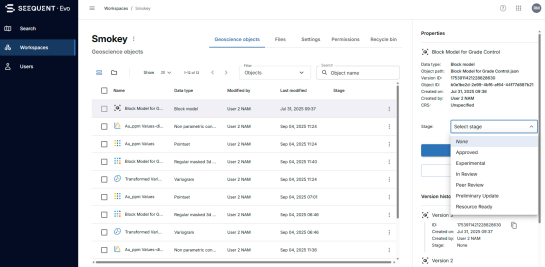
3.1. EVO数据管理Leapfrog-Evo集成的多项改进提升了效率、协作便利性和透明度,使团队能够更自信地扩展和管理数据。 3.1.1. 数据stage“stage”状态功能通过可视化提示展示数据状态,包括进行中、已完成和同行评审等。该功能允许地球科学家在对象层级标注工作阶段,从而提升跨团队和组织的透明度、可搜索性、协作效率及项目管理效能。Evo系统中设置的阶段信息会同步至平台集成的客户端应用,确保项目全生命周期及工作流中阶段处理的一致性和安全性。
3. Seequent Evo features and functionality 3.1. Evo data management Several enhancements to the Leapfrog-Evo integration have improved efficiency, ease of collaboration, and transparency, helping teams scale and manage data with greater confidence.
3.1.1. Data stage A “Stage” status provides visual cues for data status, such as work in progress, completed, and peer review. This feature allows geoscientists to mark the stages of their work at the object level, improving transparency, searchability, collaboration, and project management efficiency across teams and organisations. Stages are set in Evo and mirrored across the platform in integrated client applications, ensuring consistent and safe handling of stages throughout the workflow and lifecycle of the project.
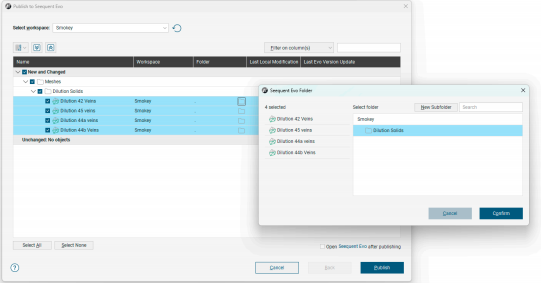
3.1.2. 用文件夹组织数据Leapfrog和Evo平台正逐步引入文件夹组织功能,帮助用户高效管理并访问结构化与非结构化数据。 Leapfrog 2025.3新增了创建并发布数据至文件夹及子文件夹的功能。当前,对应的文件夹结构尚未在Evo工作区中显示。但该功能启用后,您的Evo工作区将呈现Leapfrog中定义的文件夹层级结构。 3.1.2. Data organisation with folders Folder organisation is being phased into Leapfrog and Evo to help users efficiently manage and access both structured and unstructured data. Leapfrog 2025.3 introduces functionality for creating and publishing data to folders and subfolders. Currently, the corresponding folder structure does not appear in the Evo workspace. However, once this feature is activated, your Evo workspace will display the folder hierarchy as established in Leapfrog.
3.1.3. 从Seequent Evo批量加载最新数据Leapfrog新增批量“从Seequent Evo重新加载最新数据”功能, 旨在简化操作流程、减少人工干预。该功能可批量更新多个对象, 无需逐个手动加载,特别适用于需要实时获取Evo最新数据的大型项目。 3.1.3. Bulk reload latest from Seequent Evo A new bulk “Reload Latest from Seequent Evo” action in Leapfrog was designed to streamline work and reduce manual effort. Instead of manually reloading each Leapfrog object one by one, multiple objects can now be updated simultaneously. This is particularly useful for keeping large projects up to date with the latest data from Evo.
3.2.变异椭球体数据解析的强大新型工具椭球体数据的分析工具包已得到扩展,使地质学家能够更深入地了解构造模式及其与其它地质属性的关系。 现在可以直接对椭球体数据进行计算,包括变量、数值和类别计算,可通过新增的计算菜单项访问。这使得椭球体与其他结构数据对象保持一致,并为自定义分析开辟了新的可能性。 此外,现已提供椭球体数据的统计工具,这些数据从Driver导入,其功能与结构盘已有的功能相匹配。这使得用户能够探索椭球方向与诸如斜率等属性之间的关系,而这是以前无法实现的。 为进一步提升解释性,已对所有结构体和椭球体对象的倾角、俯仰角、方位角及强度引入了统一的着色限制。 请注意,这些功能需同时访问Seequent Evo和Driver才能在您的环境中使用。 3.2. Powerful new tools for interpreting Driver’s ellipsoid data The analytical toolkit for ellipsoid data has been expanded to give geologists deeper insight into structural patterns and their relationships with other geological attributes. Calculations can now be performed directly on ellipsoid data, including variable, numeric, and category calculations, accessible via a new calculations menu item. This brings ellipsoids in line with other structural data objects and opens new possibilities for custom analysis. In addition, statistics tools are now available for ellipsoid data imported from Driver, matching the functionality already available for structural disks. This enables users to explore relationships between ellipsoid orientation and attributes like grade, which was not possible before. To further enhance interpretation, consistent colouring limits for dip, pitch, azimuth, and strength across all structural and ellipsoid objects have been introduced. Please note, these features require access to both Seequent Evo and Driver to be available in your environment.
3.3. 属性共享在Leapfrog 2025.3版本中,地球科学家们获得了一项强大新功能:通过Seequent Evo平台采用标准化模式,可实现地质模型与数值模型体积数据属性的共享。这一升级优化了Leapfrog与Evo之间的模型数据导入导出流程,使跨团队协作和工作流的数据解读更加协调统一。通过在Evo平台发布和导入过程中保留模型属性,用户现在能够充分利用高级分析工具、可视化功能和决策支持系统,同时完整保留Leapfrog模型的上下文信息和复杂性。这标志着地球科学生态系统向深度融合迈出了重要一步,数据得以自由流动,洞见价值得到充分放大。
3.3. Seamless attribute sharing In Leapfrog 2025.3, geoscientists gain a powerful new capability: the ability to share attributes on geological and numeric model volumes using a standardized schema in Seequent Evo. This enhancement streamlines the import and export of model data between Leapfrog and Evo, enabling richer collaboration and more consistent data interpretation across teams and workflows. By preserving attributes during publish and import from Evo, users can now leverage advanced analytics, visualization, and decision-making tools without losing the context or complexity of their Leapfrog models. This marks a significant step toward a more integrated geoscience ecosystem, where data flows freely and insights are amplified.
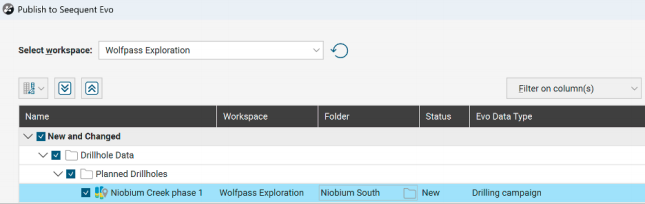
3.4. EVO对设计钻孔组的支持现在,设计的钻孔组可作为钻井活动从Evo发布和导入。这一改进促进了钻孔设计的共享,便于不同Leapfrog用户之间的协作,并在未来与Evo合作伙伴实现协作。
3.4. Evo support for planned drillhole groups Planned drillhole groups can now be published and imported from Evo as drilling campaigns. This enhancement facilitates the sharing of drillhole plans, enabling easy collaboration between different Leapfrog users and, in the future, with Evo partners.
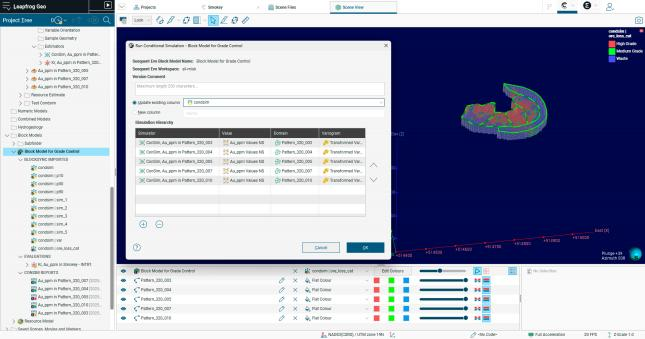
3.5. 条件模拟现已简化以提高可用性Leapfrog 2025.3版本对Leapfrog Edge的条件模拟功能进行了重大升级。此前,模拟运行仅限于本地存储的Block模型。自该版本起,条件模拟必须使用BlockSync同步模型。要执行模拟,需先将Block模型发布至BlockSync平台,这不仅支持多用户协作,还能实现对站点级模型子集的协同操作,通过记录型Block模型系统进行版本控制,并支持组合模拟等实用工作流程。 新工作流程更直观且可扩展,助力用户更智能地工作并更高效地协作。基于块模型的验证仪表板与红绿灯系统相结合,能快速根据组合体与估算的平均值差异标记结果。用户既可将模拟结果合并为单一列,也可保持独立列,从而享受更快、更高效的运行带来的性能提升。 这一改进提升了易用性,并为更高级的建模奠定了基础,但也意味着: • 局部块模型不再适用于条件模拟。 • 若从2025. 1或2025.2版本升级,本地块模型中的现有条件模拟结果将丢失。如需保留这些结果,请在升级前将块模型发布至BlockSync平台。 新工作流程更加直观,并支持可扩展的数据管理,帮助用户更智能地工作并更高效地协作。 3.5. Conditional simulation now streamlined for improved usability Leapfrog 2025.3 introduces a major change to how conditional simulation works in Leapfrog Edge. Previously, simulations could run on local block models stored in your Leapfrog project. From this release onward, conditional simulation requires a BlockSync block model. To run a simulation, the block model needs to be published to BlockSync first, enabling multi-user collaboration, working on subsets of blocks from a site-wide model, version control from the block model system of record, and practical workflows like combined simulations. The new workflow is more intuitive and scalable, helping users work smarter and collaborate more effectively. A validation dashboard under the block model, combined with a traffic-light system, quickly flags results based on the difference between the mean of composites and realizations. Users can also combine simulations into a single column or keep them separate, and enjoy performance improvements for faster, more efficient runs. This change improves usability and sets the foundation for more advanced modelling, but it also means: • Local block models can no longer be used for conditional simulation. • If you upgrade from 2025.1 or 2025.2, any existing conditional simulation results on local block models will be lost. To keep them, publish your block model to BlockSync before upgrading. The new workflow is more intuitive and supports scalable data management, helping users work smarter and collaborate more effectively.
|